Having mobile data ready as soon as you land in Japan makes a big difference.
You may need Google Maps to find your hotel, Google Translate to read Japanese, a train app to check your route, or WhatsApp, LINE, or another messaging app to contact family and friends. On a first trip to Japan, you may need internet access before you even leave the airport.
A travel eSIM can make that easier.
If your phone supports eSIM, you can prepare a travel data plan before departure without swapping a physical SIM card or looking for a SIM counter after arrival.
This guide compares three eSIM services currently available for Japan: Airalo, Saily, and GigSky.
This is not a hands-on speed test in which all three services were tested side by side in Japan. The comparison is based on the providers’ current official plan information, pricing, features, and setup instructions as checked on August 7, 2026. It is a focused comparison of these three services, not an exhaustive ranking of every eSIM provider available in Japan. The goal is to help first-time visitors understand which option may fit their trip best.
Affiliate disclosure: This article contains affiliate links. If you purchase through these links, Life with Saki may earn a commission at no extra cost to you.
Quick Answer: Which eSIM Should You Choose?
If you want the short version, start with these three choices. All three can provide travel data in Japan, but they are not identical.
Saily
BEST FOR
Simple setup and extra security
- Simple app-based setup
- Fixed-data and unlimited plans
- Extra security and data-saving features
Airalo
BEST FOR
Flexible plan sizes and trip lengths
- Several plan sizes
- Short- and long-trip options
- Fixed-data and unlimited plans
GigSky
BEST FOR
Trying an eSIM before paying
- Free 100MB trial
- No credit card required
- Fixed-data and unlimited options
Before You Buy: Check Your Phone First
Before comparing prices, check whether your phone can actually use a travel eSIM.
A cheap plan is useless if your phone does not support eSIM or is still locked to your home carrier.
Check eSIM compatibility
First, confirm the exact model of your phone.
For iPhone, Apple generally lists iPhone XS, iPhone XS Max, iPhone XR, and later models as eSIM-capable, but specifications can vary by model and region. See Apple’s international eSIM travel guidance.
Do not assume that every recent iPhone or Android phone will work. Check the exact model number before purchasing.
Check whether your phone is carrier-unlocked
Your phone also needs to be unlocked if you are adding a travel eSIM from another carrier.
On iPhone: Settings → General → About → Carrier Lock
If it says No SIM Restrictions, the phone is unlocked according to Apple’s guidance. Android steps vary by manufacturer and carrier, so check your phone maker or mobile carrier if you are unsure.
Before buying, make sure your exact phone model supports eSIM and is carrier-unlocked.
Before buying
- Check your exact phone model
- Confirm that it supports eSIM
- Confirm that it is carrier-unlocked
- Make sure you have a stable internet connection for installation
What Is an eSIM?
An eSIM is a digital SIM built into your phone or device.
Instead of removing and inserting a physical SIM card, you add a mobile plan digitally.
For travelers, the main advantage is convenience. You can often purchase and install the eSIM before flying to Japan, which means you may not need to visit a SIM counter or pick up a Pocket Wi-Fi device after landing.
On compatible Dual SIM phones, you may also be able to keep your normal SIM active while using the travel eSIM for mobile data.
For example, you can keep your home number on the phone but set the Japan eSIM as the data line.
The important part is making sure your home SIM does not accidentally use expensive roaming data while you are in Japan.
| Feature | eSIM | Physical SIM | Pocket Wi-Fi |
|---|---|---|---|
| Swap a physical SIM | No | Yes | No |
| Carry another device | No | No | Yes |
| Prepare before arrival | Usually | Depends on product | Often |
| Use with multiple devices | If tethering is supported | If tethering is supported | Easy |
| Best for | Compatible phones and solo travelers | Non-eSIM phones or specific SIM needs | Groups and multiple devices |
Airalo vs Saily vs GigSky: Full Comparison
Here is the practical difference between the three services.
| Feature | Saily | Airalo | GigSky |
|---|---|---|---|
| Fixed-data Japan plans | Yes | Yes | Yes |
| Unlimited plans | Yes | Yes | Yes |
| Hotspot / tethering | Supported | Check plan details | Supported |
| Regular voice calls / SMS | Mainly data-only; optional US number available separately | Current Japan Moshi Moshi plans are data-only | No native voice/SMS; use internet calling apps |
| Main strength | Simple management + security features | Plan flexibility | Free 100MB trial |
| Best fit | First-time users | Travelers who want more choices | Travelers who want to test first |
“Unlimited” does not always mean full-speed unlimited data
This is one of the easiest things to misunderstand when buying a travel eSIM.
An “unlimited” plan may still include a daily high-speed data allowance. After you use that amount, your connection can be slowed until the allowance resets.
As of August 7, 2026:
- Saily’s Japan unlimited plans state that the first 5GB per day is available without speed restriction, after which speed can be reduced to up to 1Mbps.
- Airalo has Japan unlimited plans that reduce speed to 1Mbps after 3GB of daily usage.
- GigSky also uses daily high-speed allowances on unlimited plans, but plan details can change and should be checked on the purchase screen.
“Unlimited” does not always mean unlimited full-speed data.
If you plan to watch a lot of video, upload large files, tether a laptop, or work remotely, check the high-speed allowance—not just the word “Unlimited.”
Saily for Japan
Saily may be a good fit for travelers who have never used an eSIM before and prefer app-based setup and management.
You buy a Japan plan, install the eSIM, and then enable the required settings when you arrive. The plan is designed to activate when the relevant conditions are met in Japan.
Why Saily may suit first-time visitors
Saily combines travel data with app-based management and extra security features.
Its official service information includes features such as malicious URL blocking, ad blocking, and virtual location tools.
You may not need all of these during a short trip, but they make Saily a little different from a basic data-only eSIM.
Saily also supports hotspot use, so you can share the connection with another device such as a laptop.
Example Japan plans
As of August 7, 2026, Saily’s fixed-data Japan plans include:
- 1GB / 7 days — US$3.99
- 3GB / 30 days — US$7.99
- 5GB / 30 days — US$10.99
- 10GB / 30 days — US$17.99
- 20GB / 30 days — US$24.99
Unlimited plans are also available.
Saily also states that its plans have a 30-day activation window. If a plan is not activated within that period, it can activate automatically, so do not buy it too far in advance without checking the current activation terms.
Prices, promotions, and available plans can change. Always confirm the current price on the purchase page before paying.
Prices checked on August 7, 2026. Current prices may change.
Does Saily give you a Japanese phone number?
No—not through the standard Japan data plan.
Saily does offer an optional phone-number feature, but as of August 7, 2026, the available number is a US +1 number, not a Japanese number.
The number costs extra and requires identity verification.
Saily’s optional phone number is a US (+1) number, not a Japanese phone number.
For a normal sightseeing trip, data-only service may still be enough if you mainly use Google Maps, LINE, WhatsApp, social media, and web search.
Airalo for Japan
Airalo is a good fit for travelers who want several plan sizes and trip-length options to compare.
Its Japan product is called Moshi Moshi and includes both fixed-data and unlimited plans.
Why choose Airalo?
Airalo’s biggest strength is plan flexibility.
As of August 7, 2026, the Japan page includes fixed-data plans from 1GB to 20GB as well as unlimited plans for several durations, including shorter and longer trips.
This makes it easier to choose a plan that roughly matches the length of your stay instead of paying for more time or data than you need.
The official Japan plan page also lists SoftBank as a primary network and shows another supported network.
Example Japan plans
Current fixed-data examples include:
- 1GB / 7 days — US$4.00
- 5GB / 30 days — US$11.00
- 10GB / 30 days — US$18.00
- 20GB / 30 days — US$25.00
Airalo also published a July 2026 article advertising a free 500MB Japan eSIM.
Because free offers and promotions can change, do not build your travel plan around that offer without checking whether it is still available.
Prices and free offers checked on August 7, 2026. Availability may change.
GigSky for Japan
GigSky has one particularly useful feature for people who are nervous about using an eSIM for the first time: a free Japan trial.
Why GigSky stands out
As of August 7, 2026, GigSky advertises a 100MB free trial for Japan.
The provider also states that no credit card is required for the trial.
100MB is not enough for long-term travel use or heavy video streaming, but it can still be useful for checking the basic process:
- Install the eSIM
- Turn it on
- Connect in Japan
- Confirm that mobile data works
For a first-time eSIM user, that can reduce some of the uncertainty before buying a larger plan.
Calls, SMS, and hotspot
GigSky’s travel eSIM is primarily for data.
Its official information states that normal SMS and voice calling are not supported, so internet-based apps such as WhatsApp are the practical alternative.
Hotspot use is supported.
GigSky also recommends installing the eSIM before departure, then turning it on after arrival so it can connect to an eligible network and activate.
Note: GigSky is included for comparison, but Life with Saki does not currently have a working affiliate link for this provider.
Check GigSky Japan Availability
How Much Data Do You Need in Japan?
There is no single correct amount of data for every trip.
The right plan depends on both your trip length and how you normally use your phone.
Light use
If you mainly use Google Maps, messaging, train searches, translation, and occasional restaurant or sightseeing searches, you may be able to start by comparing smaller plans.
Using hotel or café Wi-Fi can also reduce mobile data use.
Typical tourist use
If you expect to use Google Maps every day, post on social media, send photos, use translation apps, and search for restaurants or attractions throughout the day, a mid-sized plan may be more comfortable.
A very small plan can disappear quickly if you use your phone frequently.
Heavy use
Consider a larger plan or an unlimited option if you expect to stream video often, upload many photos or videos, tether a laptop, work remotely, or use mobile data instead of Wi-Fi most of the time.
Again, check the daily high-speed allowance on unlimited plans.
Check your current data use before buying
One of the simplest ways to estimate what you need is to look at your normal mobile data usage at home.
You can check this in your iPhone or Android settings or through your current carrier’s app.
That is usually more useful than relying on a generic claim that “the average traveler needs X GB.”
Install Your eSIM Before Flying to Japan
In most cases, it is easier to install your eSIM before departure while you still have reliable internet access.
But one distinction matters: Installing an eSIM is not always the same as activating the data plan.
Step 1: Buy the plan
Choose a plan based on your trip length and expected data use.
Before paying, check when the validity period begins. Some plans begin when they connect to a supported network in the destination, while others may use different activation rules.
Step 2: Install the eSIM while you have reliable internet
Install the eSIM at home or somewhere with stable Wi-Fi.
Depending on the provider and phone, you may install through an app, scan a QR code, or add the eSIM manually in your phone settings.
Do not leave this until the last minute at the airport if you can avoid it.
Step 3: Follow the provider’s activation instructions
After installation, follow the provider’s specific activation steps.
For example, some Airalo Japan plans begin their validity when the eSIM connects to a supported mobile network in the destination. Saily and GigSky also provide arrival-based activation instructions.
Installation and activation are not always the same thing. Check when your plan’s validity period starts.
Always check the current activation instructions in the provider’s app or official help page.
What to Do When You Land in Japan
After arriving in Japan, set your travel eSIM as the line used for mobile data.
The wording may differ between iPhone and Android and between OS versions, but the basic flow is similar.
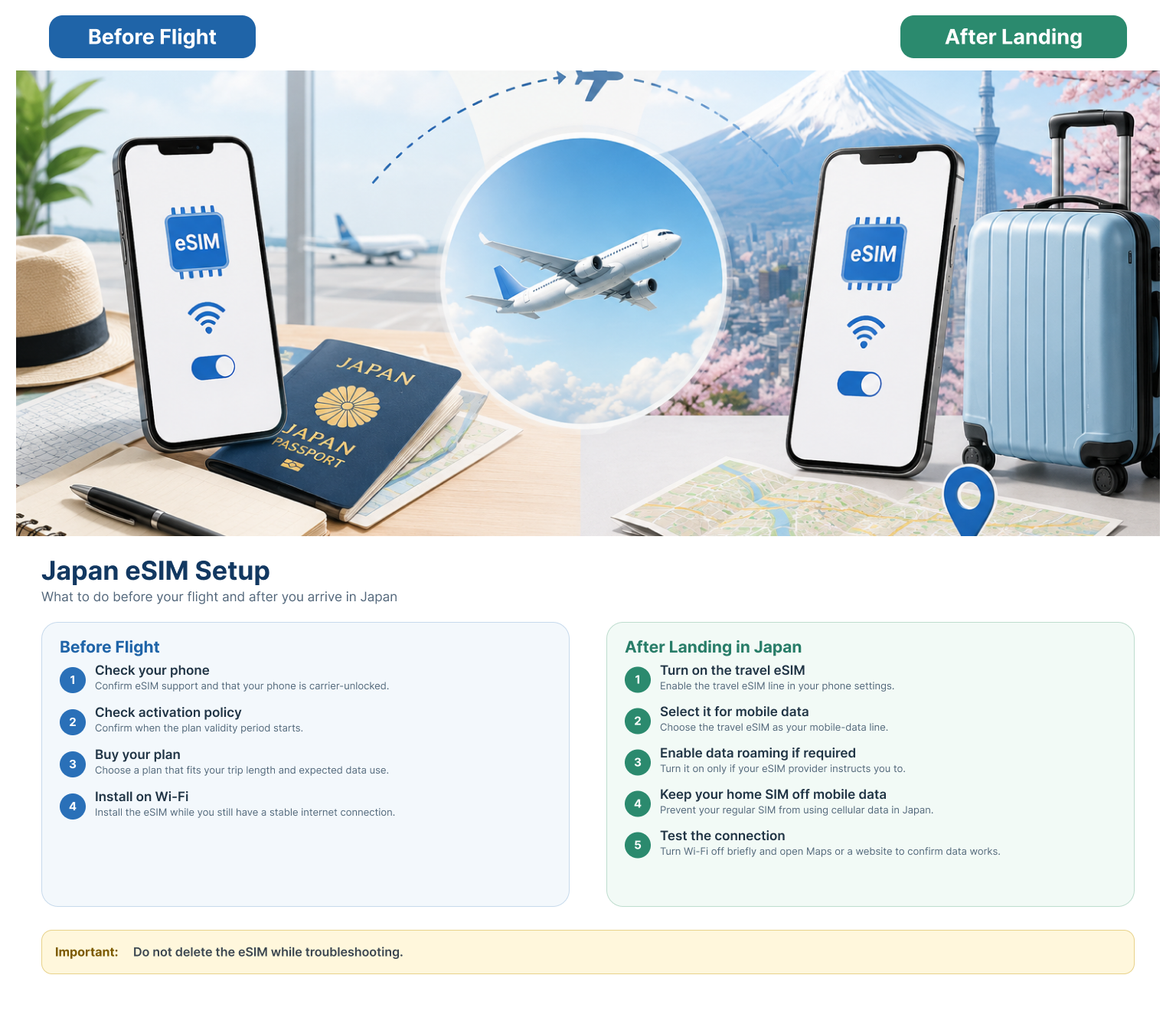
Step 1: Turn on the travel eSIM
Open your phone’s cellular or mobile network settings and make sure the travel eSIM line is enabled.
Step 2: Select the travel eSIM for mobile data
Under Cellular Data, Mobile Data, or the equivalent setting, choose the Japan travel eSIM as the line used for data.
Step 3: Enable data roaming for the travel eSIM if required
Some travel eSIM services require data roaming to be turned on for the travel eSIM.
That can sound strange because travelers are often told to avoid roaming, but travel eSIMs may use roaming agreements to connect to local partner networks.
The important thing is to distinguish your travel eSIM from your normal home SIM.
Step 4: Prevent your home SIM from using mobile data
If your regular home SIM starts using mobile data in Japan, your carrier may charge international roaming fees depending on your plan.
Make sure the travel eSIM is selected for mobile data and check settings such as data roaming and mobile data switching on your home line.
Do not let your home SIM use mobile data in Japan unless your regular plan includes Japan roaming.
Step 5: Test the connection
Open Google Maps or a web page and confirm that mobile data works.
If you are still connected to airport Wi-Fi, you may not be able to tell whether the eSIM is actually working. Temporarily turning Wi-Fi off can make the test clearer.
If Your eSIM Does Not Work
If the eSIM does not connect immediately after arrival, do not delete it right away.
Check these basics first:
- Make sure the travel eSIM line is turned on.
- Make sure it is selected for mobile data.
- Confirm the required roaming setting.
- Turn Airplane Mode on and off.
- Restart the phone.
- Check whether the provider requires any APN or network settings.
- Use the provider’s app or support page if the issue continues.
Deleting an eSIM can create a bigger problem because some eSIMs cannot simply be reinstalled with the same QR code.
Do not delete your eSIM just because it does not connect immediately.
eSIM vs Physical SIM vs Pocket Wi-Fi: Which Is Better for Japan?
An eSIM is convenient, but it is not automatically the best option for every traveler.
Choose an eSIM if…
- Your unlocked phone supports eSIM
- You are traveling alone or mainly using one phone
- You want to avoid pickup and return procedures
- You want to prepare mobile data before departure
Choose a physical SIM if…
- Your phone does not support eSIM
- You prefer a physical SIM
- You want a specific Japan SIM product that only comes as a physical card
Choose Pocket Wi-Fi if…
- Your family or group wants to connect several devices
- You are using phones, tablets, and laptops together
- You do not want to set up an eSIM on each device
Pocket Wi-Fi also has disadvantages. You need to carry another device, keep it charged, and in some cases pick it up and return it.
This article focuses on eSIMs, so Pocket Wi-Fi is better covered in a separate guide rather than turning this into an overly broad connectivity article.
Frequently Asked Questions
Can I keep my normal phone number while using a Japan eSIM?
On a compatible Dual SIM phone, you may be able to keep your normal SIM active while using the Japan eSIM for mobile data.
However, your home carrier may still charge for calls, SMS, or roaming depending on your plan. Check your carrier’s international roaming rules before departure.
Can I use WhatsApp, LINE, iMessage, or FaceTime?
Data-based apps such as WhatsApp and LINE generally work as long as your internet connection is active.
iMessage and FaceTime can depend on your Apple ID and phone-number settings, so check your configuration before travel if keeping your normal number active is important to you.
Do tourists need a Japanese phone number?
For many short sightseeing trips, no.
If you mainly need maps, translation, social media, messaging, and web search, a data-only eSIM can be enough.
However, some Japanese reservation or registration services may ask for a Japanese phone number.
Do not assume that buying a data eSIM gives you a Japanese number.
Can I use hotspot or tethering?
It depends on the provider and plan.
Saily and GigSky officially support hotspot use. For Airalo, confirm the details of the specific plan before purchasing.
Tethering a laptop can also use much more data than normal phone use.
When should I install my eSIM?
Usually, before you fly to Japan while you still have stable internet access.
But check the activation policy first, because the validity period does not always start at installation.
Can I buy an eSIM after arriving in Japan?
Yes, in many cases, as long as you have internet access.
However, preparing the eSIM before departure is usually easier than relying on airport Wi-Fi to purchase and install it after landing.
What happens when my data runs out?
It depends on the plan.
Some eSIMs can be topped up. Others let you buy another package. Some simply stop providing data when the allowance is exhausted.
If you think you may need more data during the trip, check the top-up or renewal options before buying.
Related Japan Travel Guides
Once your mobile data is sorted out, the next major travel decision is where to stay.
Where to Stay in Tokyo for First-Time Visitors: 7 Best Areas Compared
Compare Shinjuku, Shibuya, Ueno, Asakusa, Tokyo Station, Ginza, and Shinagawa for a first trip to Tokyo.